History Playback
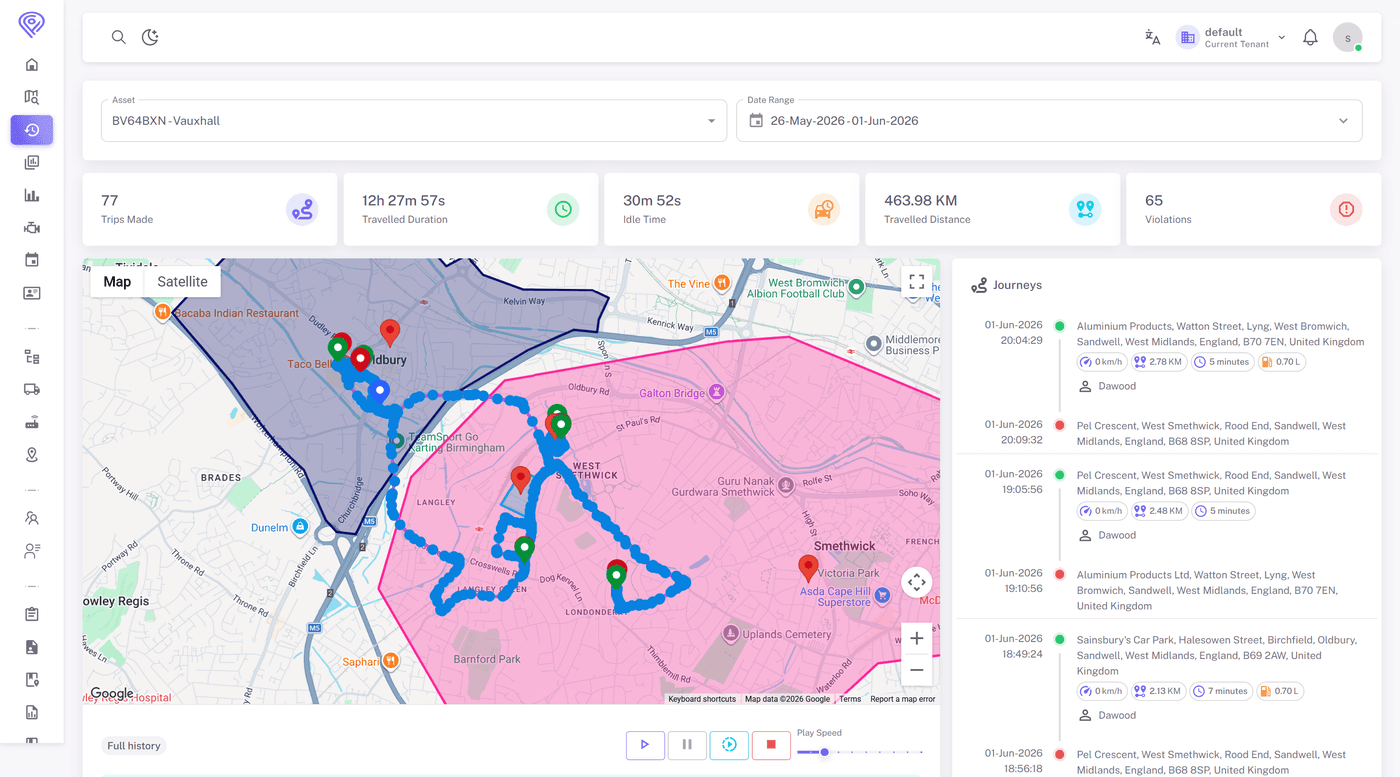
Step through any vehicle's past journey second by second. Fleetbooks stores up to 12 months of trip data and lets you replay routes on an interactive map — useful for resolving disputes, verifying service calls, and understanding driver behavior over time.
Key capabilities
What History Playback does for your fleet.
Interactive Route Replay
Scrub through a timeline to watch a vehicle move across the map. Play, pause, or jump to specific timestamps. Stop durations and event markers are shown directly on the route.
Detailed Trip Summary
Each replay session includes total distance, driving time, number of stops, idle periods, and maximum and average speed in a panel beside the map.
Long-Term Data Access
Query any date in the past 12 months. Filter by vehicle, driver, or date range. Export full trip reports as PDF or CSV for records and billing.
Who uses it
History Playback is used across industries wherever fleet visibility and control matter.
Proof of Visit
Confirm a driver was at a specific address at a specific time using GPS-verified position data and stop duration. Useful for delivery confirmation and timesheet disputes.
Incident Investigation
Re-examine a vehicle's route, speed profile, and event log in the minutes leading up to an accident or complaint.
Client Billing Verification
Generate a GPS-backed trip summary for customer invoicing or service reports, showing exact arrival time, time on site, and departure.
See History Playback in action
Book a 30-minute demo and we'll walk you through your specific use case.